Fraud Protection
To report fraud, fill out our form.
Fraud Is On The Rise
Criminals use spoofed calls, fake search ads, and fraudulent texts to gain access to your accounts. Stellar Bank will never request your PINs, passwords, or login codes by phone, text, or email. If in doubt, hang up and call us directly at 713.499.1800. Or, report fraud by filling out our form.
Fraud Is On The Rise
Banks have seen an increase in scams where customers have received calls or text messages informing them that their accounts or cards have been compromised and directing the customer to provide sensitive account information or to call either a toll free or local number. The calls may even come from a spoofed number to appear that it is a legitimate call from the bank.
Stellar Bank never requests personal banking information such as personal identification numbers (PINs), passwords, passcodes, account numbers or other sensitive information by electronic means. If you receive any requests for personal information from a phone call, email or text message, do not respond. Call Stellar Bank directly.
Fraud Resources
Trending Bank Scam Alerts
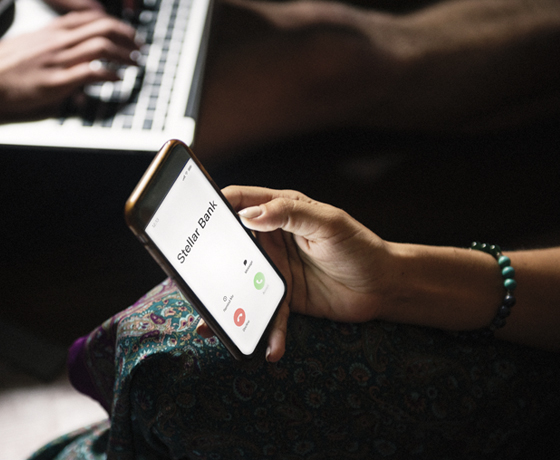
Phone Call Scam Alert
Fraudsters will take all types of actions to get you to provide your personal and banking information. Such steps include posing as bank employees calling customers from a spoofed phone number that appears to be the bank. The calls have a sense of urgency regarding an issue with your account or a transaction and the caller will request your sensitive information. Stellar Bank will NEVER unexpectedly call asking for your account numbers, passwords, PINs, or login codes. Don't share your sensitive information with anyone. Hang up and call the bank directly.
Search Engine Ad Scams
Fraudsters are creating search engine ads that link to fraudulent websites. If the link is clicked, it may download malware or ransomware on your device or there may be another phishing scheme at work. Think before you click. Watch for unusual URLs or misspellings.
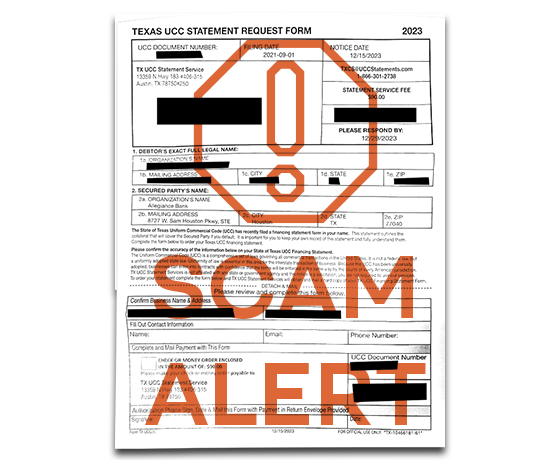
UCC Scam Alert
Businesses are being targeted with misleading communications from “Texas UCC Statement Services” requesting companies to confirm their data and pay a fee. Be cautious of mailings that appear to come from government agencies requesting payment.
Tips and Best Practices To Keep You and Your Money Safe
Protect Your Identity
Stellar Bank has procedures for protecting and monitoring our clients' accounts and personal information. The following are a few tips you can use to reduce the risk of identity theft:
- Protect Your Social Security Number - Don't carry your Social Security card in your wallet or write your Social Security number on a check. Give it out only when necessary;
- Shred Documents - Shred financial documents and personal information before discarding;
- Review Your Credit Report - Federal law requires the major nationwide credit reporting companies (Equifax, Experian, and TransUnion) to provide you with a free copy of your credit report every 12 months upon your request. Visit www.AnnualCreditReport.com to request your free copy;
- Never Click on Links in Unsolicited E-Mails - E-mails requesting account information and passwords should be deleted. These may be phishing scams;
- Protect Your Passwords - Use passwords that are hard to guess and memorize them. Avoid using predictable codes such as your birth date, mother's maiden name, or Social Security number. Do not share your passwords with anyone;
- Monitor Financial Statements - Carefully monitor bank and credit card accounts regularly for unauthorized charges by checking account information. Immediately report any suspicious activity to your financial institution; and
- Keep Personal Information Secure - Personal information not secured can be at risk:
- Do not give out personal information on the phone, through the mail, or over the internet unless you initiated the contact and know who you are dealing with;
- Avoid using public wireless connections;
- Safely store and dispose of personal information; and
- Don’t overshare on social networking sites.
Protect Your Electronic Devices
Be suspicious of e-mails purporting to be from a financial institution or government agency requesting account information or banking access credentials such as usernames, passwords, PIN codes and similar information. Opening attachments or clicking on web links in suspicious emails could expose your system to malicious code that could hijack your computer or steal your credentials. Stellar Bank will never contact you and request your passwords.
- Install a dedicated firewall
- Install virus/malware protection on all computer systems and ensure they are updated regularly
- Computers and servers should be patched regularly
- Consider spyware detection programs
- Verify use of a secure session (https, not http) in the browser for all online banking sites
- Avoid using automatic log-in features that save usernames and passwords for online banking
- Never leave a computer unattended while using any online banking service
- For businesses that conduct online transactions, it is recommended that commercial online banking activities be carried out from a stand-alone, hardened and completely locked down computer from which e-mail and web browsing are not possible
- Make frequent backups of your data
- The best protection you provide for yourself is to never give out personal information over the Internet
- Treat your mobile device with the same level of care as you would a credit card. If it is lost or stolen and you have not protected the device adequately, you may be at risk
- Password-protect your mobile device
Protect Your Business
Best Practices to Help Protect Your Company from Fraud
- Conduct daily banking reconciliations
- Initiate ACH and Wire transfer payments under dual control
- Immediately escalate any suspicious transactions to Stellar Bank
- Install virus/malware protection on all computer systems and ensure they are updated regularly
- Computers and servers should be patched regularly
- Consider spyware detection programs
- Verify use of a secure session (https, not http) in the browser for all online banking sites
- Avoid using automatic log-in features that save usernames and passwords for online banking
- Never leave a computer unattended while using any online banking service
- For businesses that conduct online transactions, it is recommended that commercial online banking activities be carried out from a stand-alone, hardened and completely locked down computer from which e-mail and web browsing are not possible
- Install a dedicated firewall
- Make frequent backups of your data
- Be suspicious of all emails, especially e-mails requesting account verification or banking access credentials such as usernames, passwords, PIN and similar information. Opening file attachments or clicking on web links in suspicious emails could expose your system to malicious code that could hijack your computer
- Create a strong password with at least 8 characters that includes a combination of mixed case letters, numbers and special characters
- Use a different password for each web site that is accessed
- Only connect to Wi-Fi networks that you absolutely trust. Turn off the automatic connect function on your mobile device. Never access online services from public Wi-Fi such as cafes, public libraries, etc.
Account Alerts
Activate account alerts
One of the easiest and most effective ways to help safeguard your finances from fraud is by setting up customizable account alerts in online banking. These alerts notify you instantly of important activity, helping you act quickly if something seems suspicious.
Stellar Bank automatically enables alerts for failed login attempts and password changes to your bank account. We recommend setting up additional alerts such as:
- Security Alerts: Get notified about suspicious activity on your account.
- Account Alerts: Monitor your account by setting a threshold that notifies you when your balance drops below a specific amount.
- History Alerts: Stay informed of large transactions or unusual activity on your account or debit card.
- Online Transaction Alerts: Receive notification when an online transaction such as Funds Transfer is authorized.
You can even customize how you receive these alerts—via email, text, or push notification—ensuring you stay informed in a way that suits your lifestyle.
Password Tips
We all know that passwords are difficult to remember, but in the long run, you will be happy that they are required. There are many malicious hackers out there in the world today and having a complicated password is just one step to making it even more difficult for them to get your personal information.
Some tips on protecting yourself with your passwords are:
- Create strong passwords with at least 8 characters (16 is even better) that includes a combination of mixed case letters, numbers and special characters
- If the form is case sensitive, make some characters upper case and some lower case
- Do not use generic passwords such as the word password, 123456789, any part of your name, address, birthday, phone number
- Use a different password for each website that is accessed
- Change the passwords a least several times each year
- Never share username and password information with anyone
- Never give out your password to anyone (not even to the bank)
- Do not write your passwords down to where someone could easily see them
ATM Safety Precautions
- Protect your Personal Identification Number (PIN) and memorize it. Do not write your PIN on the card or carry it with you, and do not share your PIN with anyone, including family and friends
- Be alert and aware of your surroundings and use an ATM that is in an open space with bright lights
- If the ATM looks different or appears to have any alterations or attachments to the card slot or PIN pad, do not use it. Immediately report anything suspicious to the bank that operates the ATM
- Focus on what you are doing. Don’t use a cell phone or do anything else that diverts your attention
- Never allow a stranger to assist you in conducting an ATM transaction, even if you have trouble and If someone appears to be loitering around the ATM, go to another location
- If the ATM retains your card, notify the branch as soon as possible
- Prevent others from seeing your PIN entry by using your body or hand to shield the ATM keypad
- If you are in a vehicle at a drive-up ATM, only open your window when you are ready to make a transaction. Keep your doors locked and the engine running
- When you are finished, put your receipt, card, and money away quickly. Count cash later in the safety of your vehicle, home, or other secure area
- As you return to your vehicle after your transaction, have your car keys ready and observe the area around your vehicle
- Go to the nearest public area where people are located if you are followed after making a transaction and call the police
- If someone does approach you and demands your money, do not resist. Remember everything you can about the person and call the police immediately

Traveling? Let Us Know So We Can Help You Avoid Hassles.
Before you travel, contact us to have a travel notice placed on your debit and credit card, so you can use them as normal on your trip without having transactions declined. Stop by a banking center or call 713.499.1800.
Explore Other Resources